
Ah xiaomi multi tool free download
If You’ve Ever Felt Stuck While Flashing A Xiaomi Phone, Dealing With Frp Locks Or Getting Errors That Just Won’t Go Away You’re Not Alone. Many Users Search For Ah Xiaomi Multi Tool Because They’re Tired Of Complicated Methods, Paid Services Or Tools That Don’t Actually Work When You Need Them Most. That Moment Of Frustration When A Phone Is On The Table And Nothing Seems To Fix It Is Exactly Why This Tool Gets So Much Attention.
In This Blog Post We’ll Walk You Through What Ah Xiaomi Multi Tool Offers And Why It’s So Useful For Mediatek (mtk) Qualcomm Fastboot And Mi Assistant Tasks. You’ll Learn About Its Flashing Options Security Features Frp And Micloud Solutions And Server Based Functions In A Clear Beginner Friendly Way. By The End You’ll Know Whether This Tool Is The Right Solution For Your Xiaomi Repair Or Unlocking Needs—and How To Use It Confidently.
What Is Ah Xiaomi Multi Tool?
Ah Xiaomi Multi Tool Is An All In One Utility Designed To Handle Common Xiaomi Software Problems. It Focuses On Flashing Partition Management Security Resets And Authentication Bypass Tasks Across Multiple Chipsets. Instead Of Switching Between Different Tools You Can Manage Most Jobs From One Interface.
What Makes It Appealing Is How It Mixes Power With Ease Of Use. You Don’t Need Deep Technical Knowledge To Perform Tasks Like Flashing Firmware Reading Gpt Or Resetting Frp. In Fact Many Technicians Rely On It Because It Saves Time And Reduces Errors During Routine Repairs.
Also Read:
Whatsaap Groups Link:
- GSM ATOZ TOOLS SOFTWAR:: Group Link Join
- GSM ATOZ TOOLS Tech::Group Link Join
- GSM ATOZ TOOLS EXPERTS::Group Link Join
- WORLD OF GSM ATOZ TOOLS::Group Link Join
- GSM ATOZ TOOLS MOBILE SOFTWARE::Group Link Join
Join Us On Telegram
- Telegram Channel: GSM ATOZ TOOLS::Link Join
- Telegram Group Link: GSM ATOZ TOOLS:: Link Join
Mediatek (mtk) Functions In Ah Xiaomi Multi Tool
For Mediatek Devices The Tool Offers A Wide Range Of Mtk V5 And Mtk V6 Functions. You Can Flash Firmware Write Or Read Partitions Rebuild Pgpt Dump The Preloader, And Manage The Full Partition Table. Details Like Lun Blocks Start Sector Partition Size And Filename Are
Shown Which Helps Avoid Mistakes.
Security-related Mtk Features Are Another Strong Point. The Tool Supports Da Agent And Da Server Options Auto Auth Files Universal Da Bypass Auth Bypass Auth2 And Crash Brom Handling. You Also Get Actions Like Read Gpt Format Reboot Auto Reboot And Nv Backup Or Restore When Needed.
Qualcomm Features In Ah Xiaomi Multi Tool
Qualcomm Support Focuses On Clean Flashing And Partition Control. You Can Select Firmware Use Auto Loader Or Browse A Specific Loader And Enable Skip Auth When Required. The Partition Option Area Displays Lun Blocks Partition Name Start Sector And Size For Accurate Flashing.
On The Security Side Qualcomm Users Can Perform Factory Reset Frp Reset Backup Efs Restore Efs Erase Efs Disable Micloud And Manage Micloud Locks. Features Like Read Gpt Erase Reboot Set Config And Set Boot Give You Flexibility During Repairs Or Software Restoration.
Mi Assistant Mode Features
Mi Assistant Mode Is Useful When Normal Flashing Or Auth Methods Fail. It Allows Factory Reset Without Auth And Frp Reset Through Assistant Mode, Which Can Be A Lifesaver For Locked Devices. This Approach Feels Safer For Beginners Because It Follows Xiaomi’s Assistant-based Flow.
Technicians Often Use This Mode When Dealing With Phones Stuck In Recovery Or Assistant Screens. It Reduces Risk While Still Letting You Complete Essential Tasks Quickly. For Many Users This Mode Alone Justifies Keeping The Tool Installed.
Status Server And Server-based Operations
Server-based Operations Connect The Tool To Online Services For Authentication-related Tasks. Through The Status Server Section You Can Perform Factory Reset Without Auth And Frp Reset Using Server Verification. This Setup Helps When Local Methods Don’t Work.
Another Benefit Is Transparency And Control. You Can Check Server Status Manage Supported Operations And Ensure The Process Runs Smoothly From Start To Finish. In Real-world Use This Means Fewer Failed Attempts And More Reliable Results When Working On Locked Xiaomi Devices.
Features
Mediatek Functions
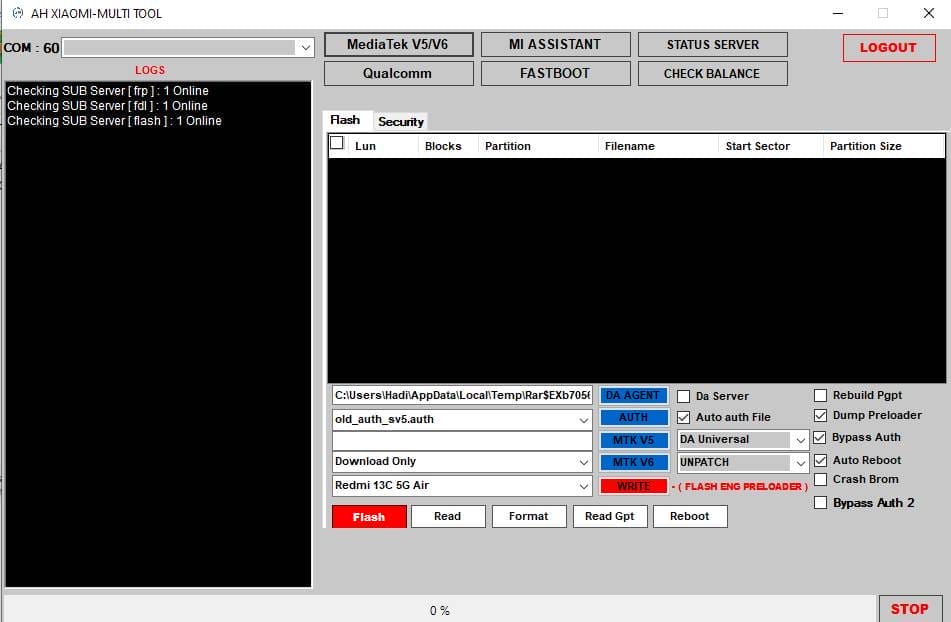
Flash:
Partition Table Area
- Lun
- Blocks
- Partition
- Start Sector
- Partition Size
- Filename
Exrta
- Da Gent
- Auth
- Mtk V5
- Mtk V6
- Write
- Da Server
- Auto Auth File
- Da Universal
- Unpatch
- Rebuild Pgpt
- Dump Preloader
- Bypass Auth
- Auto Reboot
- Crash Brom
- Bypass Auth2
Action Buttons
- Flash
- Read
- Format
- Read Gpt
- Reboot
Security:
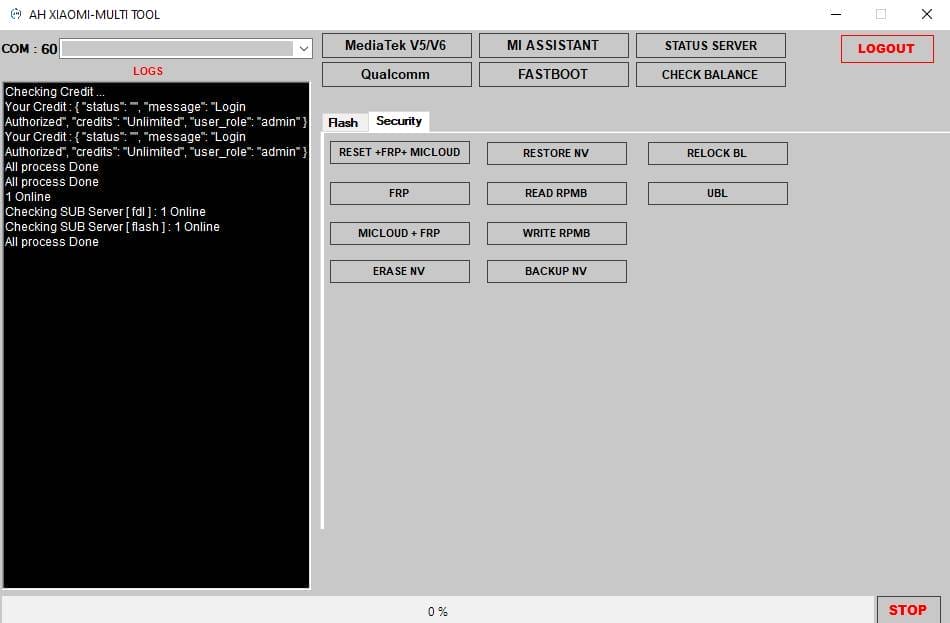
- Reset +frp+ Micloud
- Restore Nv
- Relock Bl
- Frp
- Read Rpmb
- Ubl
- Micloud Frp
- Write Rpmb
- Erase Nv
- Backup Nv
Mi Assistant
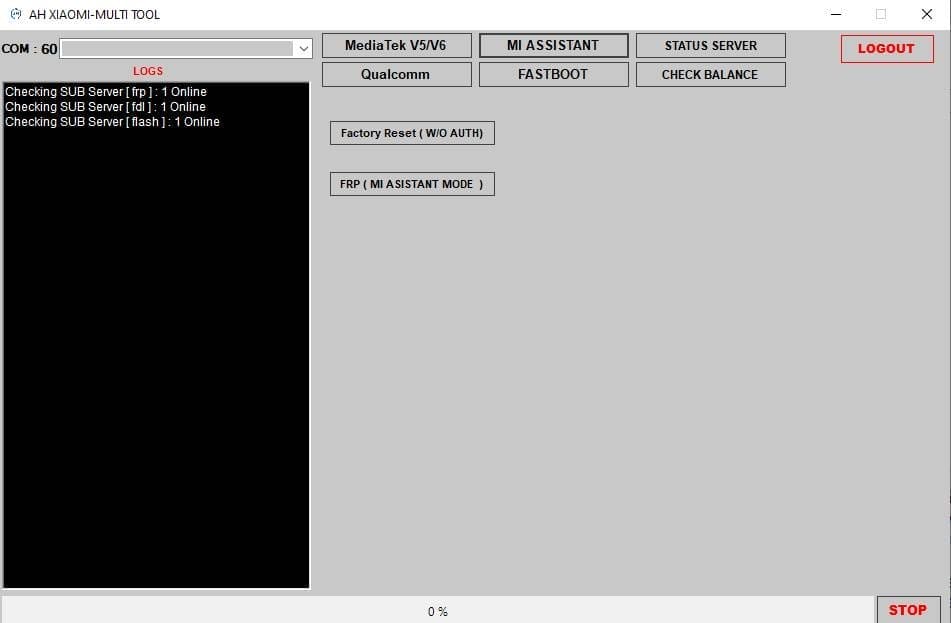
- Factory Reset(without Auth)
- Frp Reset(assistant Mode)
Status Server
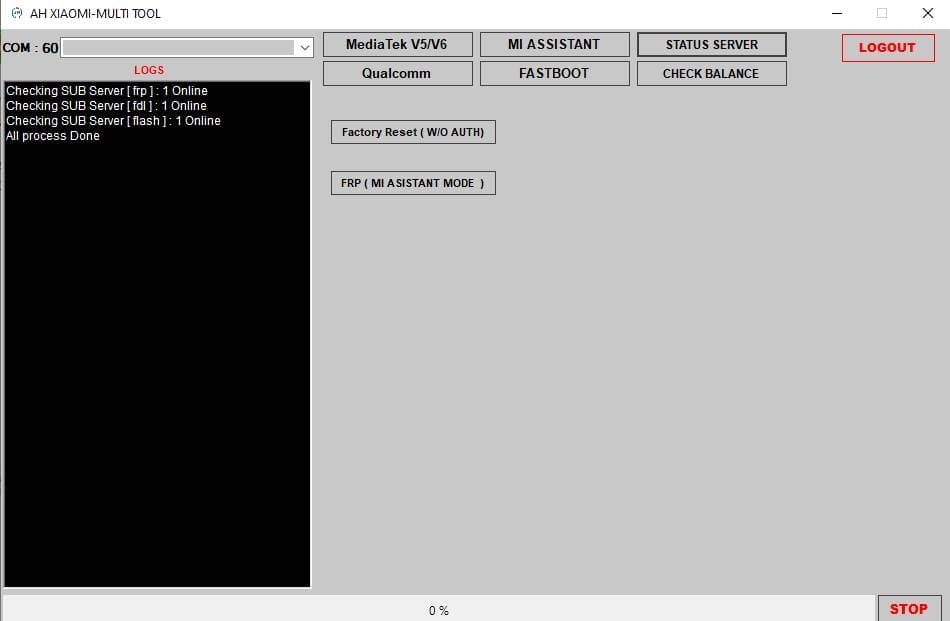
- Factory Reset(without Auth)
- Frp Reset(assistant Mode)
Qualcomm

Flash
Partition Option
- Lun
- Blocks
- Partition
- Start Sector
- Partition Size
- Filename
Extra
- Select Firmware
- Auto Loader
- Skip Auth
- Browse Loader
- Server
- Auto Reboot
Action Buttons
- Flash
- Read
- Read Gpt
- Erase
- Reboot
- Set Config
- Set Boot
Security:
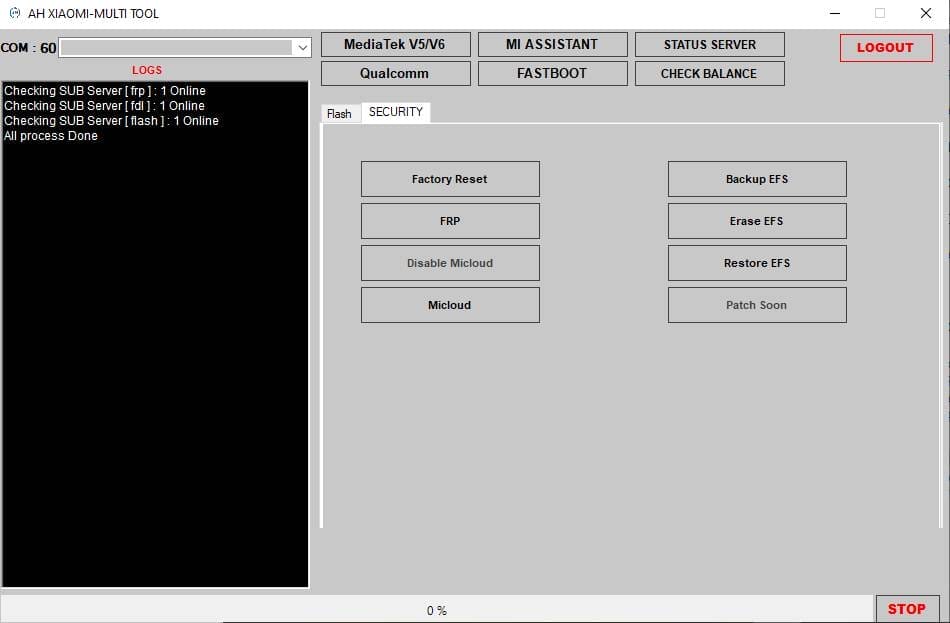
- Factory Reset
- Frp
- Backup Efs
- Erase Efs
- Disable Micloud
- Restore Efs
- Micloud
- Patch Soon
Fastboot
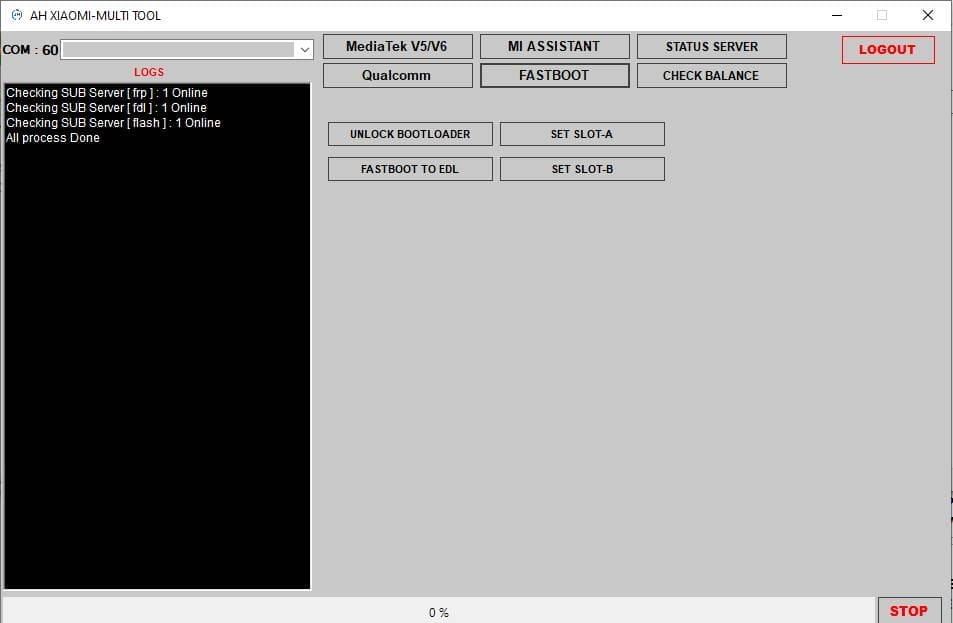
- Unlock Bootloader
- Set Slot-a
- Fastboot To Edl
- Set Slot-b
- Check Balance
How To Use It?
- First, Download The Tool.
- Extract The Rar File And Open The Folder.
- In File Content, You Can Find The Setup File By Simply Double-clicking.

- Run The Tool As Admin “AH Xiaomi Multi Tool“.
- Inside It, Click On The Activate Now Button.
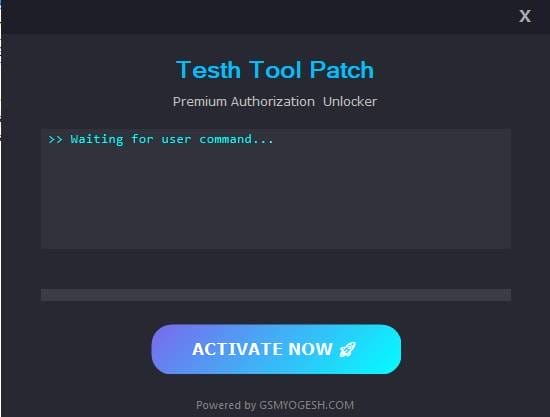
- When Asked Accept The Certificate.
- Now Go Back To The Main Ah-multi Tool Login Screen.
- Enter Any Username And Password Than Click On The Login Button
- Login Will Be Successful.
- After Login, It Will Ask For An Otp.
- Enter Any Random Number
- Click On Submit Otp
- The Tool Will Open On Your Pc Screen.
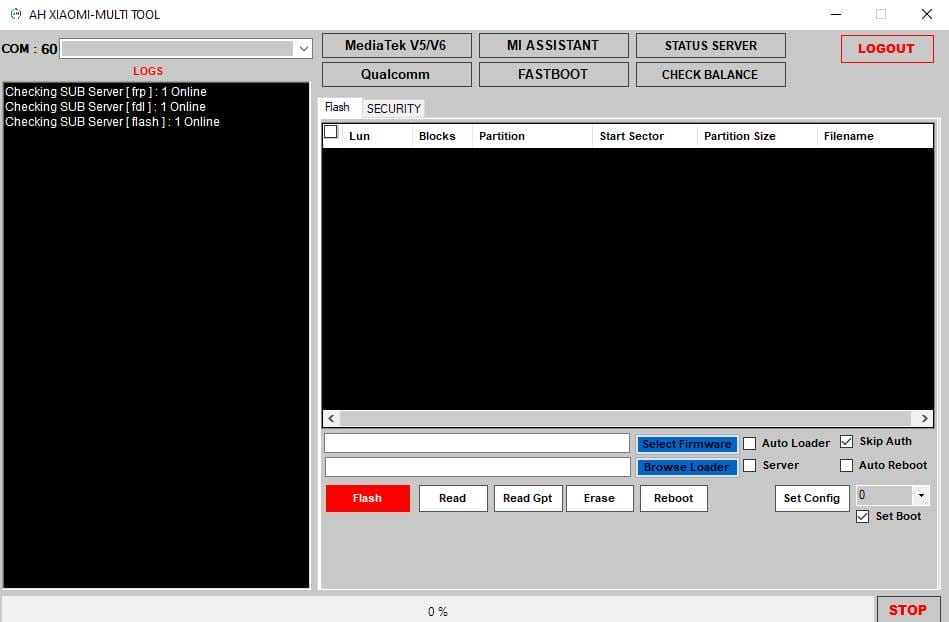
- Enjoy Using The Tool.
Frequently Asked Questions (faqs)
What Is Ah Xiaomi Multi Tool Used For?
Ah Xiaomi Multi Tool Is Used To Flash Xiaomi Devices Manage Partitions And Fix Software-related Issues. It Also Helps With Frp Reset Micloud Removal Nv/efs Backup And Authentication Bypass For Both Mediatek And Qualcomm Phones.
Does Ah Xiaomi Multi Tool Support Both Mtk And Qualcomm Devices?
Yes The Tool Supports Mediatek Mtk V5 And V6 As Well As Qualcomm Chipsets. This Makes It Useful For A Wide Range Of Xiaomi Smartphones With Different Hardware Platforms.
Can Ah Xiaomi Multi Tool Reset Frp And Micloud Locks?
Yes It Offers Multiple Options To Reset Frp And Micloud Including Security Functions Mi Assistant Mode And Server Based Operations. Some Features May Require Server Access Depending On The Device And Security Level.
Is Ah Xiaomi Multi Tool Safe For Beginners?
The Tool Is Generally Beginner-friendly Especially For Basic Tasks Like Flashing Factory Reset And Frp Reset. However Advanced Features Like Partition Writing Or Nv Operations Should Be Used Carefully To Avoid Data Loss.
Do I Need An Internet Connection To Use Ah Xiaomi Multi Tool?
An Internet Connection Is Not Always Required But Server Based Features Such As Auth Bypass Or Status Server Operations Do Need Online Access. Offline Features Like Basic Flashing And Reading Partitions Can Work Without Internet.
Final Thoughts
Overall Ah Xiaomi Multi Tool Stands Out Because It Combines Mediatek Qualcomm Mi Assistant And Server-based Features In One Place. Whether You’re Flashing Firmware Handling Frp Or Micloud Locks Or Managing Partitions It Gives You Practical Tools Without Unnecessary Complexity. If You Regularly Work On Xiaomi Phones This Tool Can Make Your Workflow Faster And Far Less Stressful.
How To Download?
- Visit The Gsmatoz Tools Website Of The Tool.
- Find The Download Page. Don’t Click The Button, And Click Only The (Download Link)
- Below Buttons Are Advertisements.Please Use The Download Links Above.
- Once The Download Is Complete, Locate The Downloaded File On Your Device.
- Tap On The File To Begin The Installation Process.
- Follow The On-screen Instructions To Complete The Installation.
AH Xiaomi Multi Tool
Password: [softwarecrackguru]






