

Android app optimizer pro tool latest version free download
Android Phones Usually Become Slow After Installing Many Applications, Updating Firmware, Or Restoring Backups. Apps May Take Longer To Open, Animations Feel Laggy, And Overall Performance Drops. Android App Optimizer Pro Is Designed To Solve These Problems By Optimizing Installed Apps Using A Safe And Automated Process.
Android App Optimizer Pro Tool Helps Refresh And Reorganize Application Files So Your Device Runs Smoother Without Needing Root Access Or Complicated Technical Steps.
What Is Android App Optimizer Pro Tool?
Android App Optimizer Pro Tool Is A Simple Windows-based Utility That Connects Your Android Device Through Usb Debugging And Performs Dex Optimization (dexopt) Automatically. This Process Rebuilds App Data In A More Efficient Way So Android Can Run Applications Faster And More Smoothly.
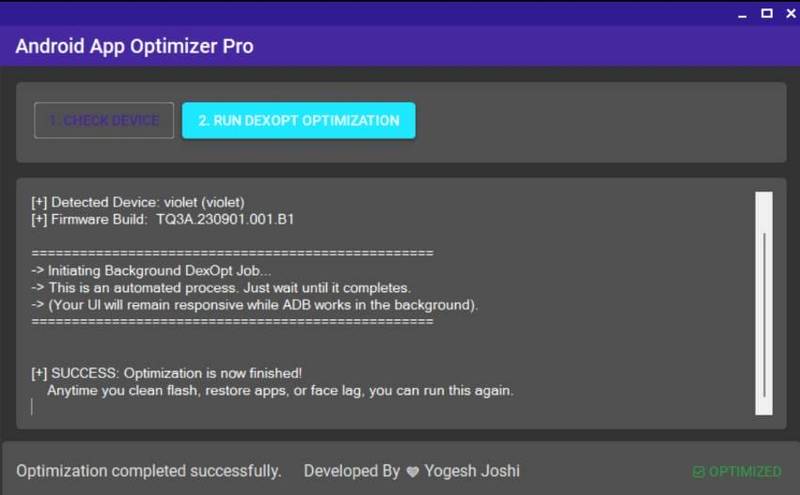
The Tool Detects Your Device, Checks Firmware Information, And Runs Optimization In The Background While Your Phone Remains Usable. It Is Especially Helpful After Flashing Firmware Or When Your Device Starts Showing Performance Issues.
Also Read:
- Crypto Blob & Tee Extractor Pro Tool
- Mysterious-Dev Tool
- Universal It Admin & Mdm Bypass Pro Tool
- Android Multi Tool
Whatsaap Groups Link:
- GSM ATOZ TOOLS SOFTWAR:: Group Link Join
- GSM ATOZ TOOLS Tech::Group Link Join
- GSM ATOZ TOOLS EXPERTS::Group Link Join
- WORLD OF GSM ATOZ TOOLS::Group Link Join
- GSM ATOZ TOOLS MOBILE SOFTWARE::Group Link Join
Join Us On Telegram
- Telegram Channel: GSM ATOZ TOOLS::Link Join
- Telegram Group Link: GSM ATOZ TOOLS:: Link Join
Main Features Of Android App Optimizer Pro Tool
- Automatic Device Detection
- One-click Optimization
- Background Optimization Process
- Performance Improvement
- One-click App Optimization
- Simple And Clean Interface
- Clear Status Messages On Screen
- Safe Process With No Data Loss
- Works With Most Android Phones
- No Confusing Command Windows
Benefits Of Using Android App Optimizer Pro Tool?
Using This Tool Can Noticeably Improve Device Performance. Many Users Experience Faster App Opening Speed, Smoother Navigation, And Reduced Freezing Issues After Running Optimization. Since Everything Is Automated, Even Users With Basic Knowledge Can Optimize Their Phones Easily.
It Is Also Very Useful For Mobile Technicians Who Regularly Flash Devices And Want Stable Performance After Setup.
How To Use It?
- First, Download The Tool.
- Extract The Rar File And Open The Folder.
- In File Content, You Can Find The Setup File By Simply Double-clicking.
- Run The Tool As Admin “Android App Optimizer Pro Tool“.
- The Tool Will Open On Your Pc Screen.
- Enjoy Using The Tool.
Faqs
Is Android App Optimizer Pro Safe?
Yes, It Only Optimizes Apps And Does Not Remove Personal Data.
Does It Require Root Access?
No, The Tool Works Through Adb Without Root.
When Should I Use This Tool?
After Flashing Firmware, Restoring Apps, Or When Your Phone Becomes Slow.
How Long Does Optimization Take?
Usually Between 5 To 20 Minutes Depending On Installed Apps.
Can I Use My Phone During Optimization?
Yes, The Process Runs In The Background.
Is App Optimization Good Or Bad?
Mobile App Optimization Is Essential For A Great User Experience—it Improves User Satisfaction And Increases User Engagement And Retention.
Final Thoughts
Android App Optimizer Pro Tool Is A Practical And Easy Solution For Improving Android Performance Without Advanced Technical Knowledge. With Its One-click Optimization System, Users Can Quickly Fix Lag Issues And Make Their Devices Feel Faster And Smoother Again.
How To Download?
- Visit The Gsmatoz Tools Website Of The Tool.
- Find The Download Page. Don’t Click The Button, And Click Only The (Download Link)
- Below Buttons Are Advertisements.Please Use The Download Links Above.
- Once The Download Is Complete, Locate The Downloaded File On Your Device.
- Tap On The File To Begin The Installation Process.
- Follow The On-screen Instructions To Complete The Installation.
Android App Optimizer Pro Tool






