

Oppo demo unlocker pro tool to remove oppo demo mode easily
Many Oppo Smartphones That Come From Retail Stores Or Display Units Are Locked In Demo Mode, Which Restricts Normal Usage. Users Cannot Fully Access Settings, Install Apps Properly, Or Use The Device Like A Personal Phone. To Solve This Problem, Oppo Demo Unlocker Pro Tool Provides A Simple And Effective Solution.
Oppo Demo Unlocker Pro Tool Is A Lightweight Windows Tool That Helps Users Remove Demo Restrictions Using Adb Mode. The Tool Is Specially Designed For Mobile Technicians And Users Who Want A Quick And Safe Method Without Complicated Commands.
Why This Tool Is Useful?
Normally Removing Demo Mode Requires Manual Adb Commands Which Can Be Confusing For Many Users. Oppo Demo Unlocker Pro Automates The Entire Process Saving Time And Reducing Errors. This Makes It Very Helpful For Gsm Technicians And Repair Shops.
Also Read:
Whatsaap Groups Link:
- GSM ATOZ TOOLS SOFTWAR:: Group Link Join
- GSM ATOZ TOOLS Tech::Group Link Join
- GSM ATOZ TOOLS EXPERTS::Group Link Join
- WORLD OF GSM ATOZ TOOLS::Group Link Join
- GSM ATOZ TOOLS MOBILE SOFTWARE::Group Link Join
Join Us On Telegram
- Telegram Channel: GSM ATOZ TOOLS::Link Join
- Telegram Group Link: GSM ATOZ TOOLS:: Link Join
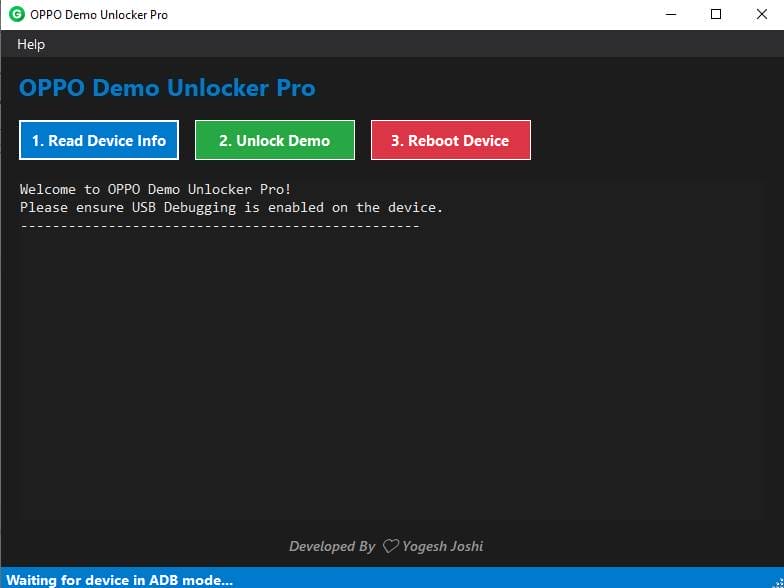
Main Features Of Oppo Demo Unlocker Pro Tool
- Read Device Information
- Unlock OPPO Demo Mode
- Reboot Device Option
How To Use It?
- First, Download The Tool.
- Extract The Rar File And Open The Folder.
- In File Content You Can Find The Setup File By Simply Double-clicking.

- Run The Tool As Admin “Oppo Demo Unlocker Pro Tool“.
Follow These Simple Steps:
- Install Usb/adb Drivers On Your Pc.
- Enable Usb Debugging From Developer Options On Your Oppo Phone.
- Connect The Device Using A Usb Cable.
- Launch Oppo Demo Unlocker Pro On Your Computer.
- Click Read Device Info To Verify Connection.
- Press Unlock Demo To Start Removing Demo Mode.
- Finally, Click Reboot Device.
- After Reboot The Device Should Work Normally.
Important Tips
- Always Create A Backup Before Unlocking.
- Do Not Disconnect The Device During The Process.
- Use The Tool Only On Authorized Devices.
Frequently Asked Questions (Faqs)
What Does Oppo Demo Unlocker Pro Do?
It Removes Demo Mode Restrictions From Oppo Smartphones Using Adb Connection.
Do I Need Root Access?
No The Tool Works Without Rooting The Device.
Why Is My Phone Not Detected?
Make Sure Usb Debugging Is Enabled And Drivers Are Installed Correctly.
Is This Tool Beginner Friendly?
Yes The Interface Is Simple And Requires Only A Few Clicks.
Does The Tool Reboot The Device Automatically?
Yes You Can Reboot The Device Directly From The Tool.
How To Download?
- Visit The Gsmatoz Tools Website Of The Tool.
- Find The Download Page. Don’t Click The Button, And Click Only The (Download Link)
- Below Buttons Are Advertisements.Please Use The Download Links Above.
- Once The Download Is Complete, Locate The Downloaded File On Your Device.
- Tap On The File To Begin The Installation Process.
- Follow The On-screen Instructions To Complete The Installation.
Oppo Demo Unlocker Pro Tool






