

Universal patcher tool v1. 0 permanent mdm patch tool
Universal Patcher Tool V1.0 (Tester) Is A Powerful All In One Patching Tool Designed For Mtk Spd Samsung And Hmd Devices. It Allows Users To Easily Patch Miscdata Proinfo And Mdm Files With A Simple Load And Patch Process Making Mobile Repairing Faster And More Efficient.
This Tool Is Specially Developed For Mobile Technicians And Advanced Users Who Need A Quick And Reliable Solution For Device Patching Tasks. Universal Patcher Tool V1.0 Offers A Clean Interface Safe File Processing And Automatic Creation Of Patched Files Without Modifying The Original Data Ensuring Secure And Efficient Operations For Different Smartphone Platforms.
What Is Universal Patcher Tool?
The Universal Patcher Tool Is An All In One Patching Utility Created For Mobile Repair Professionals Who Regularly Work With Firmware Files. It Provides Multiple Sections Like Patcher Spd/mtk Samsung Hmd And Utilities Allowing Users To Switch Tasks Without Opening Separate Programs. The Interface Feels Straightforward So Even New Technicians Can Understand It Quickly.
Inside The Patcher Section You’ll Find Options Such As Miscdata Proinfo Patching With A Load File Option And Patch Button For Fast Processing. The Tool Supports Bin And Img Files Commonly Used In Android Servicing. Because Everything Follows A Clear Step By Step Layout You Don’t Waste Time Searching For Functions.
Also Read:
Whatsaap Groups Link:
- GSM ATOZ TOOLS SOFTWAR:: Group Link Join
- GSM ATOZ TOOLS Tech::Group Link Join
- GSM ATOZ TOOLS EXPERTS::Group Link Join
- WORLD OF GSM ATOZ TOOLS::Group Link Join
- GSM ATOZ TOOLS MOBILE SOFTWARE::Group Link Join
Join Us On Telegram
- Telegram Channel: GSM ATOZ TOOLS::Link Join
- Telegram Group Link: GSM ATOZ TOOLS:: Link Join
Universal Patch Mtk/spd Explained
The Universal Patch Mtk/spd Feature Allows You To Patch Mediatek And Spreadtrum Files Using A Single Workflow. Instead Of Handling Chipset Tools Separately You Simply Load The File And Press The Patch Button. This Unified Process Makes Firmware Modification Faster And More Consistent.
Spd Patch Beta Also Expands Compatibility By Adding Experimental Support For Spd Devices. For Example When Working On Test Firmware Technicians Can Apply Patch Functions Without Complex Manual Edits. In Fact This Section Helps Reduce Technical Errors Because The Process Remains Guided And Structured.
Permanent Mdm Patch Process
The Permanent Mdm Patch Feature Works In Two Clear Stages Designed To Ensure Proper Modification. In Step 1 You Load The Required File And Apply The Patch Option. After Completion Step 2 Repeats The Process To Finalize The Changes And Prepare The Patched Output.
This Two Step System Improves Reliability Because Each Stage Verifies The Patching Result Before Moving Forward. Many Technicians Prefer This Workflow Since It Minimizes Failed Operations. When Using The Universal Patcher Tool The Original File Stays Untouched While A New Patched File Is Automatically Generated.
Features
Main Tabs
- Patcher
- Spd/mtk
- Samsung
- Hmd
- Utilities
Patcher Section Features
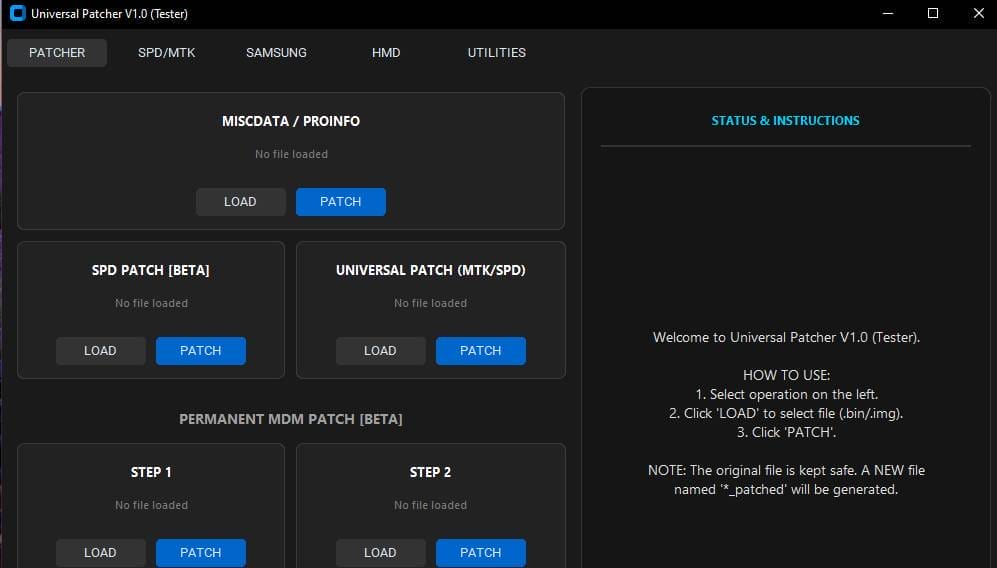
Miscdata / Proinfo
- Load File Option
- Patch Button
Spd Patch [beta]
- Load File
- Patch Function
- Spd Device Patch Support (beta)
Universal Patch (mtk/spd)
- Load File
- Patch Button
- Works For Mtk & Spd Files
Permanent Mdm Patch [beta]
Step 1
- Load File
- Patch Option
Step 2
- Load File
- Patch Option
Note: Spd/mtk, Samsung, Hmd, Utilities Comming Soon
How To Use?
- First, Download The Tool.
- Extract The Rar File And Open The Folder.
- In File Content, You Can Find The Setup File By Simply Double-clicking.

- A Setup Will Open In Front Of You. Click Next To Continue.
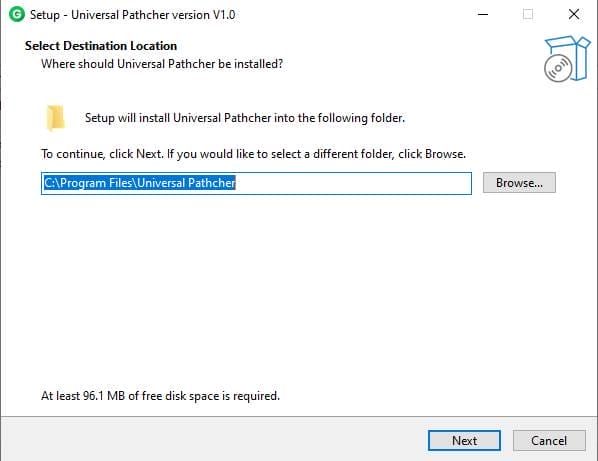
- Click Next To Create A Shortcut.
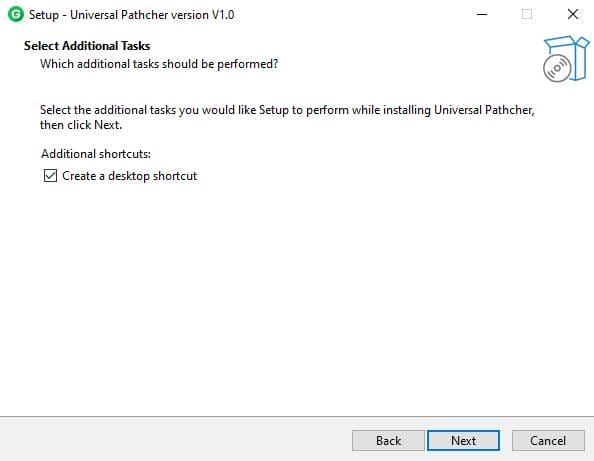
- Now, A Setup Will Open In Front Of You. Click Install To Continue The Installation.
- After Some Time, The Tool Will Be Installed On Your Pc.
- After The Installation Is Complete, Click On Finish To Close The Setup.
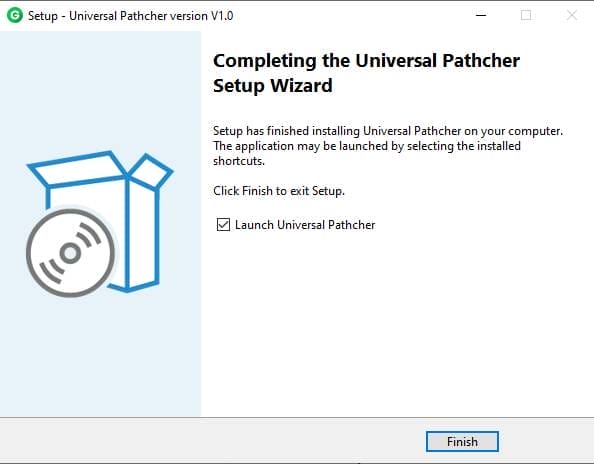
- Go To The Desktop Of Your Pc And Open The Tool.
- Run The Tool As Admin “Universal Patcher Tool“.
- The Tool Will Open On Your Pc Screen.
- Select Operation On The Left
- Click Load To Select File (bin/img)
- Click Patch
- Enjoy!
Final Thoughts
Modern Mobile Repair Requires Tools That Are Simple Yet Powerful, And This Software Fits That Need Well. With Organized Main Tabs Like Patcher Spd/mtk Samsung Hmd And Utilities Users Can Handle Multiple Repair Scenarios Without Confusion. The Logical Layout Makes Daily Servicing Smoother And More Efficient.
Overall The Universal Patcher Tool Offers A Practical Solution For Firmware Patching And Mdm Modification Tasks. Whether You’re Handling Routine Repairs Or Testing Firmware Changes The Tool Provides A Safe And Beginner Friendly Environment. If You Value Speed Clarity And Reliability This Patching Utility Becomes A Useful Addition To Your Repair Toolkit.
Frequently Asked Questions (faqs)
Is Universal Patcher Free?
In This Video I Go Over An Introduction To Universal Patcher And How I Use It For Free To Remove Vats And Other Functions Without The Need For An Xdf File Or Checksum Plugin.
Can A Patcher Damage My Files?
Damage: Some Patches May Unexpectedly ‘damage’ Others Apps Or Systems Your Company Uses Or Delete Files People Were Working On.
What Are The Risks Of Patching?
Applying Patches To Hardware And Software Applications May Bring About Additional Risks To The It Environment Because Patches Are Programs And May Have Their Own Set Of Vulnerabilities. If A Patching Process Is Not Handled Properly It May Lead To System Crashes Or Damage Hardware Devices.
How To Download?
- The Gsmatoz Tools Website Of The Tool.
- Find The Download Page. Don’t Click The Button, And Click Only The (Download Link)
- below Buttons Are Advertisements. Please Use The Download Links Above.
- Once The Download Is Complete, Locate The Downloaded File On Your Device.
- Tap On The File To Begin The Installation Process.
- Follow The On-screen Instructions To Complete The Installation.
Universal Patcher Tool






