

Universal rom flasher pro tool flash android firmware easily
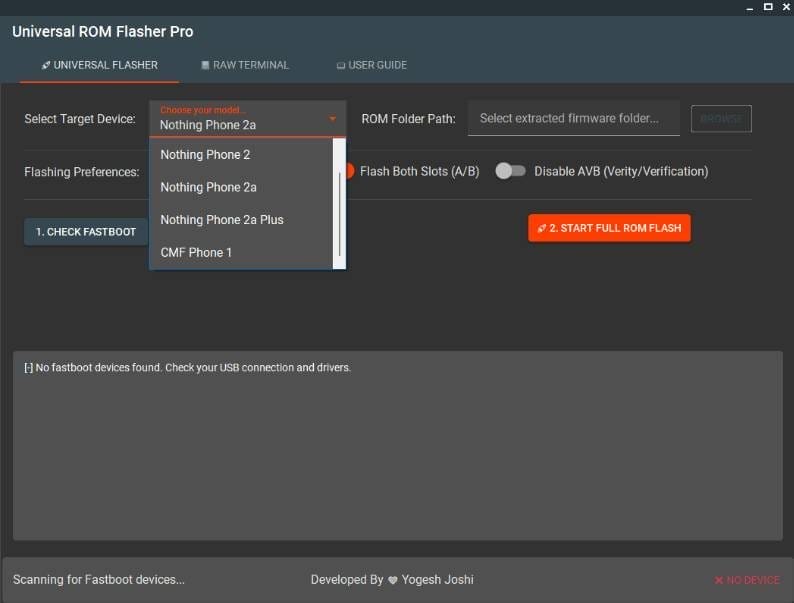
Android Device Flashing Has Become Much Easier With Modern Service Tools. Universal Rom Flasher Pro Is A Powerful Utility Designed To Help Users Flash Firmware On Supported Android Devices Quickly And Safely. The Tool Provides A Simple Interface Where Users Can Select Their Device Model, Load Firmware Files, And Start The Flashing Process With Just A Few Clicks.
This Tool Is Especially Useful For Mobile Technicians, Developers, And Advanced Android Users Who Need A Reliable Way To Install Or Reinstall Stock Roms. With Its Fastboot Integration And Automated Flashing Process, Universal Rom Flasher Pro Simplifies Complex Flashing Tasks.
What Is Universal Rom Flasher Pro Tool?
Universal Rom Flasher Pro Tool Is An Android Flashing Utility That Allows Users To Install Stock Firmware On Supported Devices Through Fastboot Mode. The Tool Automatically Detects Devices Connected To The Computer And Enables Flashing Of Rom Files Stored On The System.
It Supports Multiple Models Including Devices From The Nothing Brand And Other Compatible Models. The Tool Can Flash Both System Slots (a/b) And Also Allows Users To Disable Avb Verification For Advanced Flashing Operations.
Also Read:
Whatsaap Groups Link:
- GSM ATOZ TOOLS SOFTWAR:: Group Link Join
- GSM ATOZ TOOLS Tech::Group Link Join
- GSM ATOZ TOOLS EXPERTS::Group Link Join
- WORLD OF GSM ATOZ TOOLS::Group Link Join
- GSM ATOZ TOOLS MOBILE SOFTWARE::Group Link Join
Join Us On Telegram
- Telegram Channel: GSM ATOZ TOOLS::Link Join
- Telegram Group Link: GSM ATOZ TOOLS:: Link Join
Benefits Of Using Universal Rom Flasher Pro Tool
Universal Rom Flasher Pro Tool Makes Firmware Flashing Much Easier Compared To Manual Fastboot Commands. The Tool Automates Complex Processes And Reduces The Chances Of Errors. It Is Especially Helpful For Mobile Repair Technicians And Android Enthusiasts Who Regularly Flash Firmware For Device Repair, Software Upgrades, Or Troubleshooting.
Another Major Advantage Is The Ability To Flash A/b Slot Devices, Which Many Traditional Tools Do Not Support Properly.
Key Features Of Universal Rom Flasher Pro Tool
Multiple Device Support
- Nothing Phone 2
- Nothing Phone 2a
- Nothing Phone 2a Plus
- Cmf Phone 1
- Fastboot Device Detection
- Rom Folder Selection
- Flash Both Slots (a/b)
- Disable Avb Verification
- One-click Full Rom Flash
How To Use It?
- First, Download The Tool.
- Extract The Rar File And Open The Folder.
- In File Content, You Can Find The Setup File By Simply Double-clicking.
- Run The Tool As Admin “Universal Rom Flasher Pro Tool“.
- The Tool Will Open On Your Pc Screen.
- Enjoy Using The Tool.
Frequently Asked Questions (faqs)
Is Flashing Rom Safe?
Flashing A Rom Changes The Core Software Of Your Mobile Device. It Can Improve Performance And Extend Phone Life, But It Can Also Introduce Risks If Done Without Understanding.
Can I Install Any Rom On My Android?
It Is Possible To Get An Alternative Rom Running On It
Can I Change The Rom Of My Phone?
It Is Recommended To Only Flash A Custom Rom If You Are Experienced With Android
Conclusion
Universal Rom Flasher Pro Is A Powerful And User-friendly Firmware Flashing Tool Designed For Android Devices. With Its Clean Interface, Automatic Fastboot Detection, And Support For Modern A/b Partition Devices, It Provides A Reliable Solution For Flashing Stock Firmware.
Whether You Are A Mobile Technician Or An Android Enthusiast, This Tool Can Save Time And Simplify The Flashing Process Significantly.
How To Download?
- Visit The Gsmatoz Tools Website Of The Tool.
- Find The Download Page. Don’t Click The Button, And Click Only The (Download Link)
- Below Buttons Are Advertisements.Please Use The Download Links Above.
- Once The Download Is Complete, Locate The Downloaded File On Your Device.
- Tap On The File To Begin The Installation Process.
- Follow The On-screen Instructions To Complete The Installation.
Universal Rom Flasher Pro Tool





